Is it still 200?
Still200 asks that question about your cron jobs, scheduled AI agents, and APIs around the clock and tells you the moment the answer is no, by email or in Slack.

Building software got easier. Keeping it running didn't.
AI has dramatically reduced the cost of building software. It hasn't done the same for making it reliable, observable, secure, and economical in production.
If anything, there's more software to operate than ever. And as systems become more autonomous and complex, keeping them running only gets harder.
We're building the reliability layer for small teams and AI-native companies. It starts with the most basic question in operations: is it still working? Still200 tells you the moment it isn't.
Cron jobs don't crash loudly. They just stop.
A backup that never started throws no error and writes no log line. Neither does a scheduled AI agent that quietly stopped looping. You find out weeks later. Still200 knows when every run is due, so silence becomes an alert, and every run that does happen gets timed.
Nightly DB backup
Healthy0 3 * * *At 03:00 AM, every day · UTC · max duration 30 min| Expected run | Status | Started | Duration | Error |
|---|---|---|---|---|
| Today, 03:00 | Running | 03:00:04 | 4m 12s | — |
| Yesterday, 03:00 | Success | 03:00:02 | 4m 38s | — |
| Sep 22, 03:00 | Late | 03:07:41 | 4m 51s | — |
| Sep 21, 03:00 | Failed | 03:00:03 | 19s | pg_dump: connection refused |
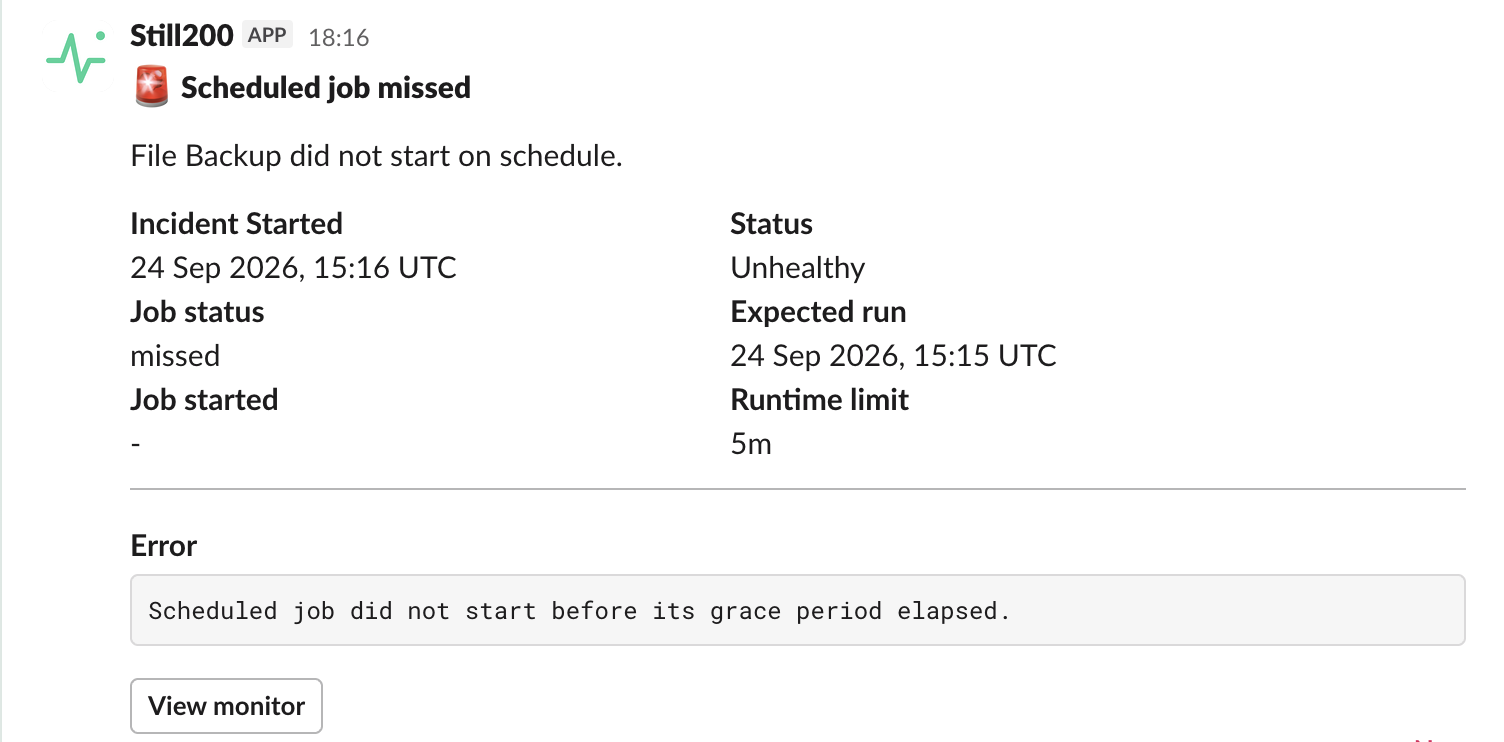
| Sep 20, 03:00 | Missed | — | — | Did not start before its grace period elapsed |
Finished inside its window.
Ran, but only after the grace period. Still counts, still visible.
Never showed up. This is the one nothing else catches.
Your job reported its own failure, error message included.
Started and still going, with a live timer counting up.
Know how long every run takes
Start, finish, and duration on every run. Spot the backup that used to take four minutes and now takes forty, before it overlaps the next one.
Catch jobs that never finish
Set a max duration, and a run that's still going past it gets flagged instead of silently holding a lock all night.
Schedules you can read
Paste the cron expression you already use, pick a timezone, and see exactly what it means before you save. A grace period absorbs the slow nights.
Watch scheduled agent loops too
Know when a cron job, background task, or AI agent loop that runs on a schedule fails to run, hangs, or doesn't finish on time. It's just a ping at the start and end of each run.
A 200 isn't always a yes.
Plenty of things return 200 while quietly falling apart: a database connection timing out, a dependency that's down, a response that now takes nine seconds. Still200 looks behind the status code.
Point it at a URL. That's the setup.
No agent to install, no SDK to import, nothing to deploy next to your app.
Checked on a fixed schedule
Every minute on Pro, every five on Free. Every check records the response and how long it took.
Health checks, not just status codes
If your endpoint reports on its dependencies, each one is tracked, so you can see which piece took the service down.
Degraded is its own state
Slow or partly failing isn't the same as down. You see the difference before it becomes an outage.
Payment API
Degraded| Service | Status | Latency |
|---|---|---|
| database | Healthy | 12.40ms |
| cache | Healthy | 3.10ms |
| payment_gateway | Degraded | 2,410.00ms |
One alert. With the answer attached.
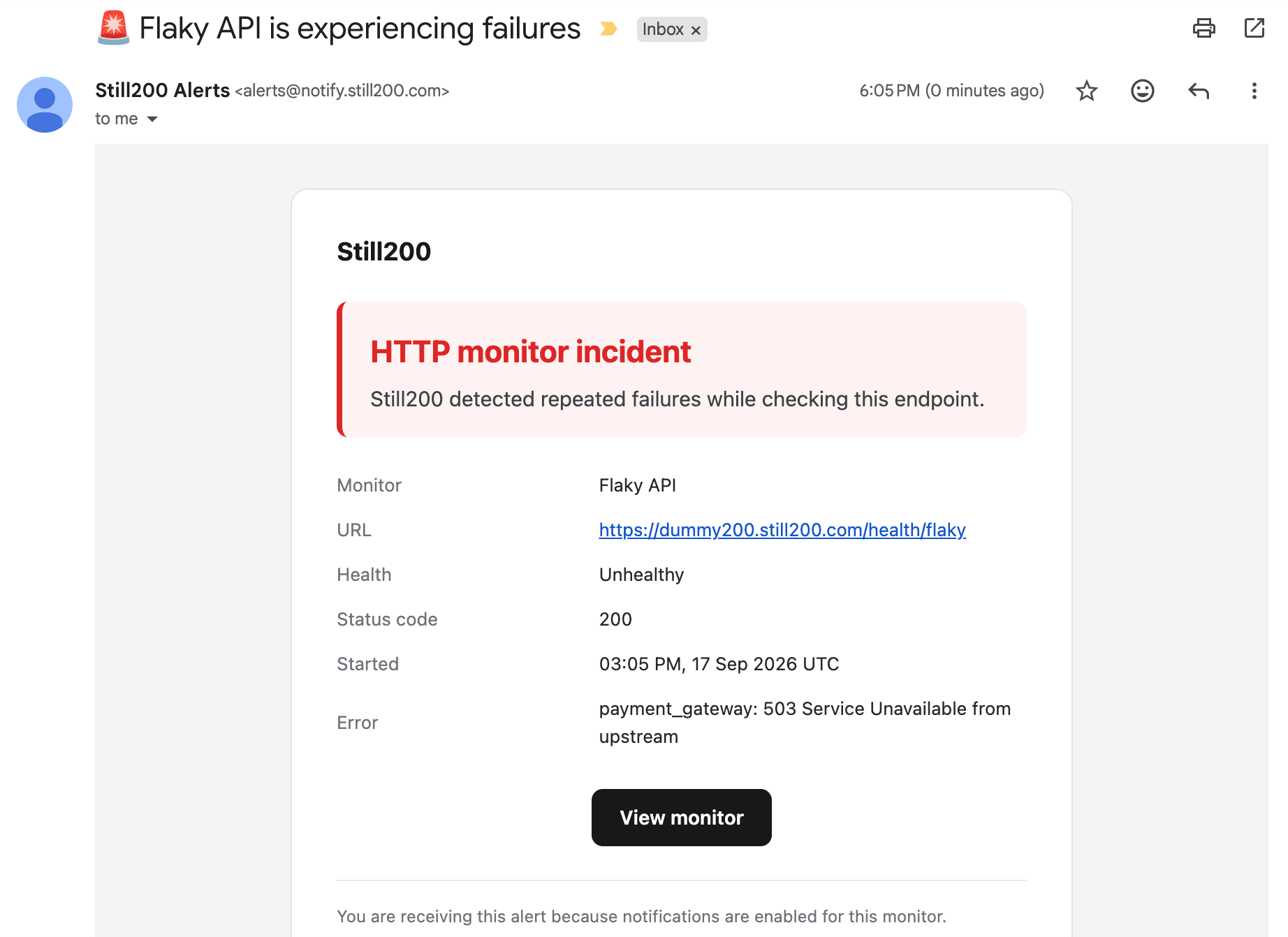
Still200 waits until a failure repeats, so one blip doesn't wake you up. Then you get one clear alert with the status, the error, and the dependency that failed, then one more when it recovers. Not a new one every minute until you fix it.
- Payments API still returns 200, but it isn't OK
Its health check reports
payment_gateway: 503 Service Unavailable from upstream - Failure confirmed, incident opened
It failed again on the next check, so this isn't a blip. The status, error, and failing dependency are captured
- You're alerted
An email lands in your inbox, and a message posts to #alerts in Slack
- Healthy again
Recovery alert sent. The incident closes with its duration on record: 11 minutes
The monitor, its health, the status code, and the exact error from the dependency that failed. You start debugging with a real lead, not a blank page.
Slack
PROPick a channel once, and incidents post where your team already talks. The whole team sees it, and nobody has to forward anything.
What changes when something's watching.
You hear it from us, not from a customer.
The first report of an outage comes from an alert, not a support ticket or an angry post.
The alert already points at the problem.
Status code, error, and the failing dependency are in the message. You open your laptop knowing where to look.
Silent failures stop being silent.
The cron job that quietly stopped running gets caught the same night, not three weeks later.
Slow gets noticed before down.
Degraded responses and latency history show a service struggling while there's still time to fix it.
You know when you can stop worrying.
A recovery alert tells you it's back, and every incident keeps its start, end, and duration.
Five minutes to set up. Then you forget it.
A URL or a cron schedule is the whole setup. No agents, no config files, no stack to maintain.
One flat price. No usage bills.
Start free and upgrade when you need faster checks, more monitors, or Slack. Every plan monitors cron jobs, agents, and endpoints.
Everything you need to start watching your services.
- Up to 5 service monitors
- Checks every 5 minutes
- Instant email alerts
- 7-day uptime & latency history
- Slack alerts
- Priority support
For developers who take uptime seriously.
- Up to 30 service monitors
- Checks every minute
- Instant email alerts
- Slack alerts
- 30-day uptime & latency history
- Monitor dependent services (e.g. database, Redis)
- Priority support
Cancel anytime from your billing settings. No contracts, no phone calls.
Questions, answered.
How does cron job monitoring work?
You tell Still200 the cron schedule your job already runs on, plus a grace period. Your job then pings us when it starts and when it finishes. If a run never checks in before the grace period elapses, we mark it missed and open an incident. If the job reports its own failure, we capture that too, along with the error and how long the run took.
Is cron monitoring included on the Free plan?
Yes. Every plan includes both monitor types. Only the monitor count, check interval, and history window differ. A cron monitor counts the same as an endpoint monitor toward your plan's limit, so you can mix the two however you like.
Where do alerts go?
Email alerts are included on every plan. On Pro you can also connect a Slack workspace from your settings and choose the channel incidents post to. You can change the channel or disconnect at any time.
What happens if I go over my plan's monitor limit?
You'll see an upgrade prompt before you can add another one, so nothing breaks silently. If you downgrade from Pro while over the Free limit, the extra monitors are automatically paused, and you can resume any of them up to your new limit at any time.
How often are checks actually run?
Endpoints are checked every 5 minutes on Free and every 1 minute on Pro. The schedule is fixed and predictable, with no variable or best-effort timing. Cron monitors aren't polled at all: they run on your job's own schedule, and we measure against that.
How long is my history kept?
7 days of uptime and latency history on Free, 30 days on Pro. Incident records follow the same window.
Can I cancel anytime?
Yes. Manage or cancel your subscription directly from your billing settings. No contracts, no phone calls.
Can I invite my team?COMING SOON
Not yet, but team workspaces are on the way. For now each account is individual. In the meantime, connecting Slack is the easiest way to keep everyone in the loop: alerts post to a shared channel the whole team can see.
Do you have public status pages?COMING SOON
Not yet, but they're on the roadmap. For now, every monitor has its own incident history inside your dashboard.
Ship it. We'll tell you if it stops returning 200.
Your first monitor takes about as long as reading this sentence twice.